 RU
RU EN
EN ES
ES FR
FR HI
HI JA
JA KO
KO MS
MS PT
PT TR
TR






How do I log in to the launcher?

Greetings, Klauncher's support is with you. In this article we will talk in detail about the authorization methods in our launcher.
How do I log in to the launcher?
Greetings, Klauncher's support is with you. In this article we will tell you in detail about the authorization methods in our launcher.
1) How do I log in?
Press the "" buttonChange account". We get to the menu with three types of authorization.
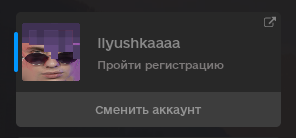
At the top, in the "Saved Accounts" tab, you will see all your accounts that have been authorized. If there are no accounts, it doesn't matter, just add them

Next, you need to select one of the authorization methods and click the Login button. We'll talk about the authorization methods themselves later.

2) Authorization methods
At the moment there are 3 ways to log in to the launcher: through the KLauncher account, through the Microsoft account and through the nickname.

Choose the authorization method that is convenient for you and enter your data. Click the sign in button.
1. Method - Kluncher account
In the KLauncher account, you need to enter your Username and password. If you have not registered, then click the "register" button, you will be transferred to our website.

2. Method - Microsoft Account
The procedure is the same with a Microsoft account. You need to enter the login and password from the account.

2. Method - Microsoft Account
The easiest way to log in is to log in using Nickname. You just enter your Nickname and that's it. But this method of authorization will not allow you to play on licensed servers. Also, you will not have to count the number of hours played.

Any other questions? Set them in our group in Vkontakte.