 RU
RU EN
EN ES
ES FR
FR HI
HI JA
JA KO
KO MS
MS PT
PT TR
TR






Baixar Minecraft 22W45A
22W45A is the fourth snapshot of version 1.19.3
Minecraft Snapshot 22w45a
Java snapshot of Minecraft
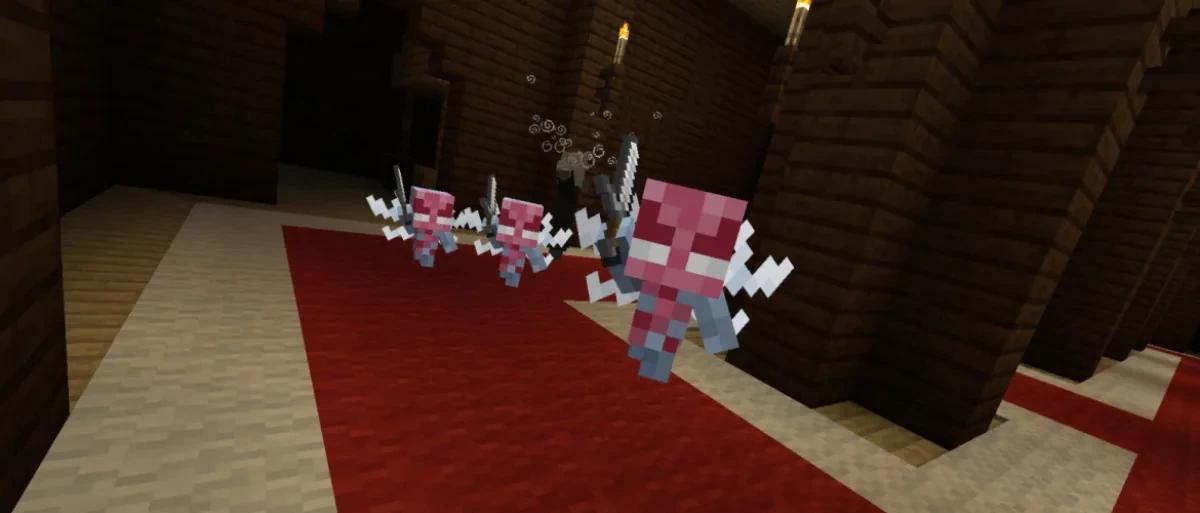
This snapshot features new default skins for offline players, bamboo blocks, and a visual update for vex. In addition, there are some additional settings for the creative inventory.
NEW FEATURES OF 22W45A
- Added new default skins for offline players.
- A bamboo block and a bamboo board block have been added.
- The bamboo block can be made of 9 bamboos and can be disassembled like other logs.
- Bamboo boards made from a block of bamboo give only 2 boards compared to 4 for wooden logs.
CHANGES IN 22W45A
- Vex now has a new look.- The Wild update music has been changed to be a little less loud.
- When opening the shalker boxes, the blocks attached to the open faces (for example, torches) are pushed out.
- Blocks requiring support cannot be placed on these open faces while the Shalker box is open.
- The option "Teleport to a team member" in the viewer menu is now displayed only for teams with viable target players.
- Added the option of the "Operator Elements" tab in the "Controls" menu, which is disabled by default.
- Changes in the creative inventory.
VEX
- Changes in the Vex model and textures.
- The Vex hitbox has been slightly enlarged to make it easier to fight with it.
CHANGES IN CREATIVE INVENTORY
- Operator-only items are now displayed in the new Operator Utilities tab if you have both:
- The "Operator elements" tab in the "Controls" menu is enabled
- Required operator rights.
- The tab is hidden if the operator's rights are lost when the inventory is open.
- Now also includes structural blocks and all levels of illumination of light blocks.
- Added the "Colored blocks" tab.
- Contains all blocks with 16 color options.
- All colored blocks from the "Building Blocks" tab have been moved to this tab to reduce the size of the tab.
- The "Consumables" tab has been renamed to the "Food and Drinks" tab to have a simpler name.
- The "Creation" tab has been renamed to the "Ingredients" tab, since not all items are used during creation.
- Reordered:
- Natural blocks:
- More consistency between types for the upper part.
- Eggs are moved between seeds and single-block plants.
- Place climbing plants above two-block plants.
- Food drinks
- Cooked versions of raw food are now next to each other.
- Redstone blocks
- Less cluttered.
- Elements of higher importance at the top.
Removed options for doors, hatches, buttons and boats that have no functional difference.
- Ingredients
- The lapis lazuli are placed in the same order as the ore blocks.
- Axes have been added to the Weapons and Armor tab.
- Other sorting of creative inventory.
- Tooltips showing a tab with an item are now displayed everywhere for all items, except for the tabs in which they are.
- Previously, suggestions were only in the "Search" tab.
Texture changes
- The textures of the raft and the raft with the chest in the form of an object have been changed.
- Changed the shade of the scaffolding to better match the new bamboo blocks.
INSTALLATION SNAPSHOT 22W45A
The easiest and best way to install a snapshot is to use Klauncher.
