



 RU
RU EN
EN ES
ES FR
FR HI
HI JA
JA KO
KO MS
MS PT
PT TR
TR
Why doesn't he count the hours?
Information
Go back
Many users may have encountered the problem that their hours are not counted while playing Minecraft.This is a pretty simple problem that can be solved in just a minute.
If you have tried the methods below and nothing has helped you, be sure to contact our VK group.
What needs to be done?
First you need to open the launcher and check if you are logged in
through the KLauncher account.
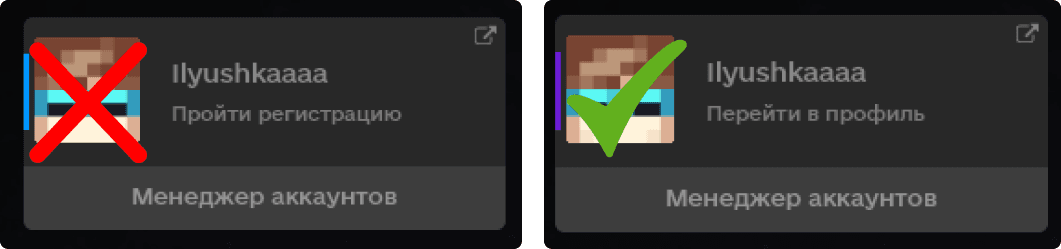
In the picture on the left, you are logged in through a “Nickname” and even if you have an account created, you see your skin and cape, this does not mean that the hours will be counted.
Для корректного отображения часов, вам лишь следует авторизоваться в
лаунчере правильно(not on the site! Namely, in the launcher itself!)through an account
KLauncher.

If you are logged in, but the watch has
you are not counted anyway:
- Do not close the launcher completely if the launcher closed, then the time calculation does not work
- Try to delete other launchers, they may affect the counting time
- Try disabling Antivirus software and check if the time is changing.
- The time spent in the game is sent to our server only after you have logged out of the game. The calculation begins from the moment you clicked on the play button!
If none of the above helped you, in this case, contact us in VK support
Contact VK support